Instagram, the social media app by Meta allows us to connect with one another by sharing videos and photos. As one of the biggest apps in the social space and the world at large, it has become important for businesses and organizations to be able to share content they post on Instagram on their website.
Luckily, Instagram makes that process very easy, and this guide will walk you through step-by-step on how to embed Instagram post on website.
How to embed Instagram post on website
- On the computer/desktop, go to the post on Instagram that you want to embed on your website.
- Click on the three dots “…” on the top right corner of the post above the caption.

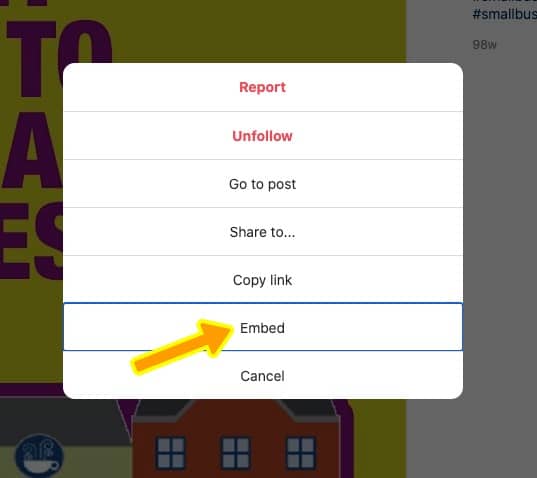
- Click on the “Embed” option in the pop-up
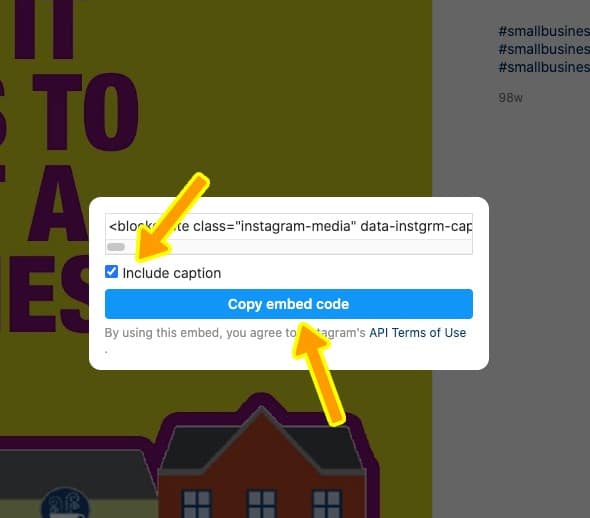
- You will be presented with an option to ‘include caption’. Check or uncheck it to display or not display the Instagram post caption on your website.
- Click on the “Copy embed code” button
6. Paste the Instagram post embed code where you want it to appear on your website. In a post, page, etc.
How to embed Instagram post on WordPress
Using a WordPress website? Simply add the copied code to an HTML widget.
If you have questions or need help embedding Instagram post on your website, feel free to send us a message.
source https://digitalchores.co/embed-instagram-post-on-website/




No comments:
Post a Comment